
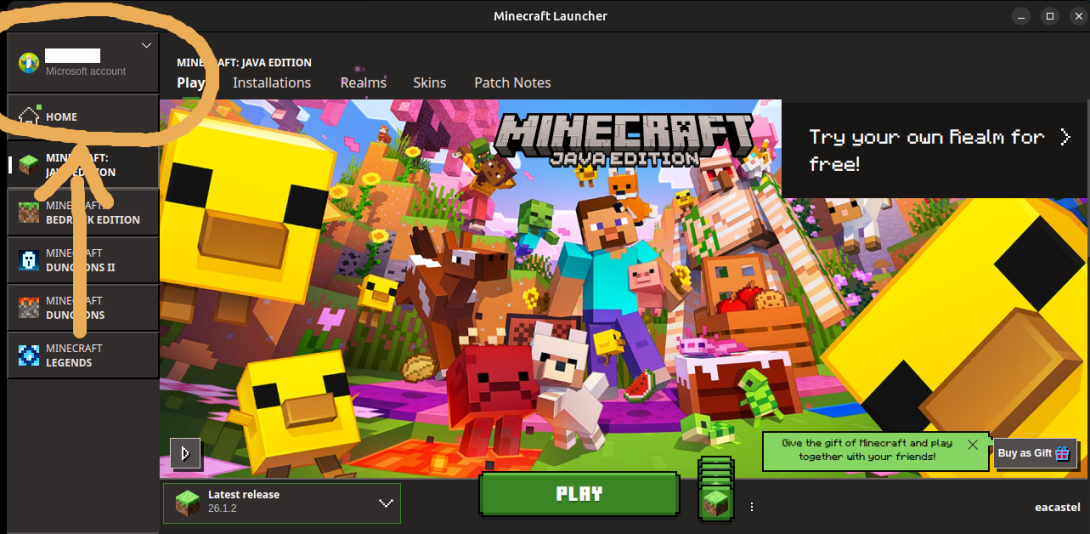
When signing up for ENDOS SMP, you must enter the player's Minecraft Java Edition username. This is one of the most common signup mistakes, especially for families who also see Xbox, Bedrock, or Microsoft account names.
What is a Minecraft username?
A Minecraft username is the player name attached to a Minecraft profile. For ENDOS SMP, the important one is the Java Edition profile name. That is the username the approved access checks when the player tries to join the server.
Why the Java username matters
ENDOS SMP is a Minecraft Java server. The approved access uses the player's Java profile name, not an Xbox gamertag, email address, Microsoft account name, or Bedrock display name. If the wrong name is submitted, the server may say the player is not approved even after approval.
How to find your Minecraft Java username
- Open the official Minecraft Launcher.
- Sign in with the Microsoft account used for Minecraft.
- Select Minecraft: Java Edition.
- Look for the profile name shown for Java Edition.
- Enter that name exactly on the ENDOS SMP signup form.
How to check the username before submitting
If possible, launch Minecraft Java Edition before completing the form. Confirm that the username appears in the Java profile area and that it matches exactly, including spelling, numbers, capitalization, and underscores.
How to change your Minecraft username
If the player needs to change their Minecraft username, use the official Minecraft account tools from Mojang or Microsoft. ENDOS SMP cannot change a player's Minecraft username, but the updated name must match the Java Edition profile name before the player can be approved correctly.
After changing a Minecraft username, open the Minecraft Launcher again and confirm the new Java Edition profile name before submitting or updating an ENDOS SMP access request. If a previous application used the old name, send the corrected Java username through the appeal form or the support path provided by ENDOS SMP.
What not to enter
- Do not enter a parent email address.
- Do not enter an Xbox gamertag unless it is also exactly the Java profile name.
- Do not enter a Bedrock-only display name.
- Do not enter the Microsoft account login name.
- Do not enter an old Minecraft username after changing it.
Is ENDOS SMP a username checker?
No. ENDOS SMP does not replace Mojang or Microsoft account tools. This guide helps families identify the correct username to submit for the ENDOS SMP approved access. If you need to manage the account itself, use the official Minecraft Launcher and Microsoft account settings.
What if the wrong username was submitted?
If the wrong name was entered, the player may not be added to the approved access correctly. Review the Java username, then use the appeal form or the support path provided by ENDOS SMP so the team can review the registration.
Need Java Edition first? Read our guide on getting Minecraft Java Edition before signing up. If you are ready to apply, start with the ENDOS SMP signup form.