Resources
Minecraft for Gifted Builders, Coders, Storytellers, and Problem-Solvers
For Curious Minecraft Players
Minecraft for gifted builders, coders, storytellers, and problem-solvers
ENDOS SMP is a private Minecraft Java server for families who want more than random public-server noise. It is a good fit for kids who like to build, experiment, solve problems, design systems, write stories, and collaborate with other approved players.
ENDOS SMP Community Highlights
Made and discovered together
A shared build, a clever redstone idea, or a discovery with friends: community highlights can come from everyday play as well as organised NEXUS events.
Community gallery
There are no published recaps here yet. Screenshots and stories can be added as community highlights become available.
Explore activities for your next session, or apply to join ENDOS SMP.
ENDOS SMP Activities & Community
Your next adventure
Something to build. Something to discover.
ENDOS SMP is a Minecraft Java community for approved players who enjoy building, exploring, and working together. Start a personal project, team up with a friend, or try a daily goal whenever you play.
The server is available around the clock, subject to maintenance. Choose a play time that works for your family.
Your Email Has Been Confirmed
Thank you for confirming your email address. Your ENDOS SMP registration has moved to access review.
Our team reviews submissions before adding players to the server approved access. This helps keep ENDOS SMP more respectful, safer, and better suited for younger players and families.
Check Your Email to Complete Registration
We sent a confirmation email to the address used on the ENDOS SMP signup form. Please open that message and click the confirmation link to finish this step.
Your registration cannot move into access review until the email confirmation is complete.
How to Find or Change Your Minecraft Username
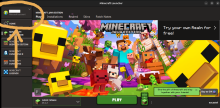
When signing up for ENDOS SMP, you must enter the player's Minecraft Java Edition username. This is one of the most common signup mistakes, especially for families who also see Xbox, Bedrock, or Microsoft account names.
What is a Minecraft username?
A Minecraft username is the player name attached to a Minecraft profile. For ENDOS SMP, the important one is the Java Edition profile name. That is the username the approved access checks when the player tries to join the server.
How ENDOS Keeps Kids Safe
ENDOS SMP is a private Minecraft Java SMP for younger players and families. The goal is not just to give kids another server to join. The goal is to make multiplayer feel more intentional, more respectful, and easier for parents to understand than a random public server.
No online multiplayer space can guarantee complete safety. ENDOS reduces risk through approved-player access, clear kid-safe rules, build protection, moderation, reporting paths, and parent involvement.
ENDOS SMP - Server Rules
These rules help ensure a respectful, fair, and enjoyable experience for everyone on ENDOS SMP. By playing on the server, you agree to follow these guidelines. While we do our best to maintain a safe environment, parental supervision is always encouraged. Breaking rules may result in warnings, temporary mutes, kicks, or bans.
Appeal Form
This page is for players who have been banned from ENDOS SMP and want to ask for another review. We read appeals carefully, but submitting this form does not guarantee that a ban will be removed.
Terms of Use – Endos SMP
Last updated: 19 July 2025
These Terms of Use govern access to the ENDOS SMP website and Minecraft server. They explain who the service is for, what standards apply to players and families, and how use of the site and server is handled.
Before using the site or joining the server, here is the short version: